dbt Formatter, a small VS Code extension for dbt models
dbt Formatter, a small VS Code extension for dbt models
dbt Formatter is a free VS Code extension for people who write dbt models (in VS Code, its menu is called Lazy DBT). It formats your SQL the dbt way and handles a few other boring tasks from a single right-click menu.
Why I built it
I am not the youngest data guy around. I grew up with SQL Server, and for twenty years my SQL looked the same: keywords in UPPERCASE, everything neatly indented, PascalCase names, the good old Microsoft way. It was not perfect, but it was mine.
Then dbt came along. We use it on a Microsoft Fabric warehouse, and we decided to follow the dbt style guide: lowercase keywords, snake_case everywhere, trailing commas, one column per line. I still find it ugly. But a team needs one style, and it is a good style, so I gave in.
The problem is that my fingers did not. Every model I wrote came out the old way and had to be reworked. Same for the chores around a model: writing the schema .yml, checking which doc() descriptions are missing, figuring out what depends on what, or replacing ref() with real table names to run the query in Fabric.
I wanted all of that in one right-click, without any setup. So I vibe coded it with Claude Code, over a few evenings.
What it does
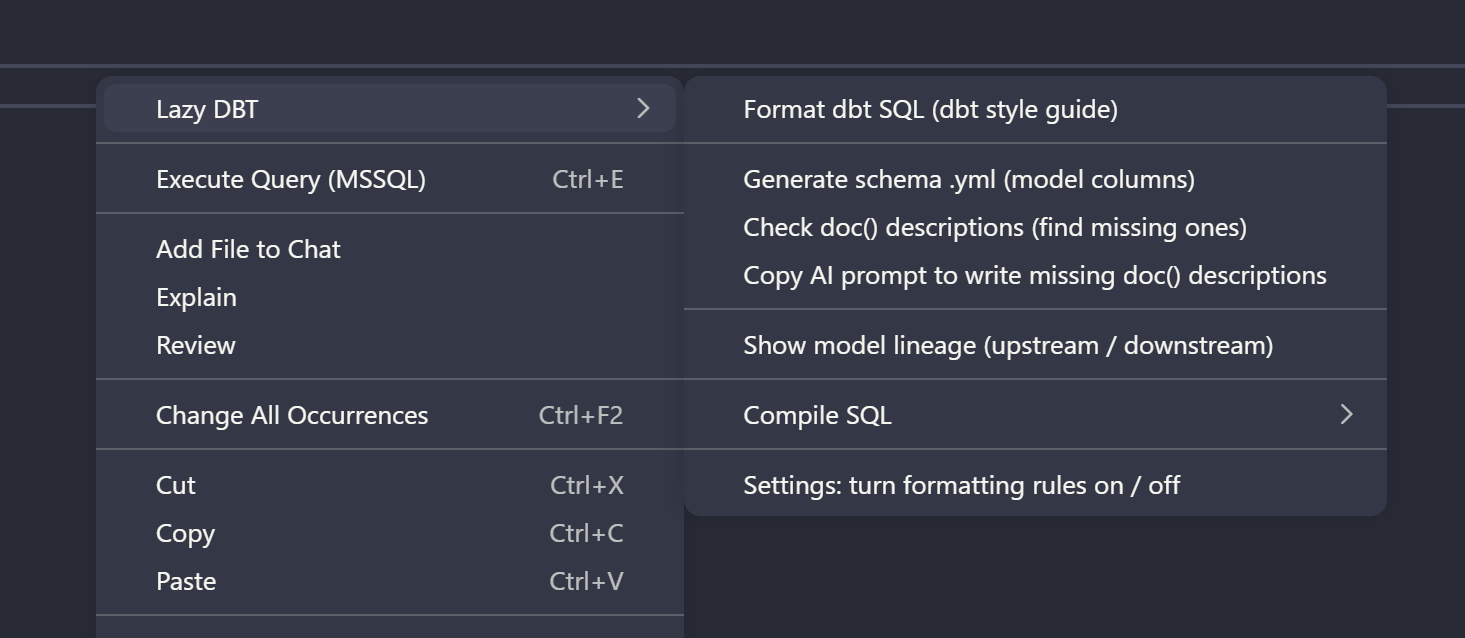
Right-click in any .sql model file and open the Lazy DBT submenu.
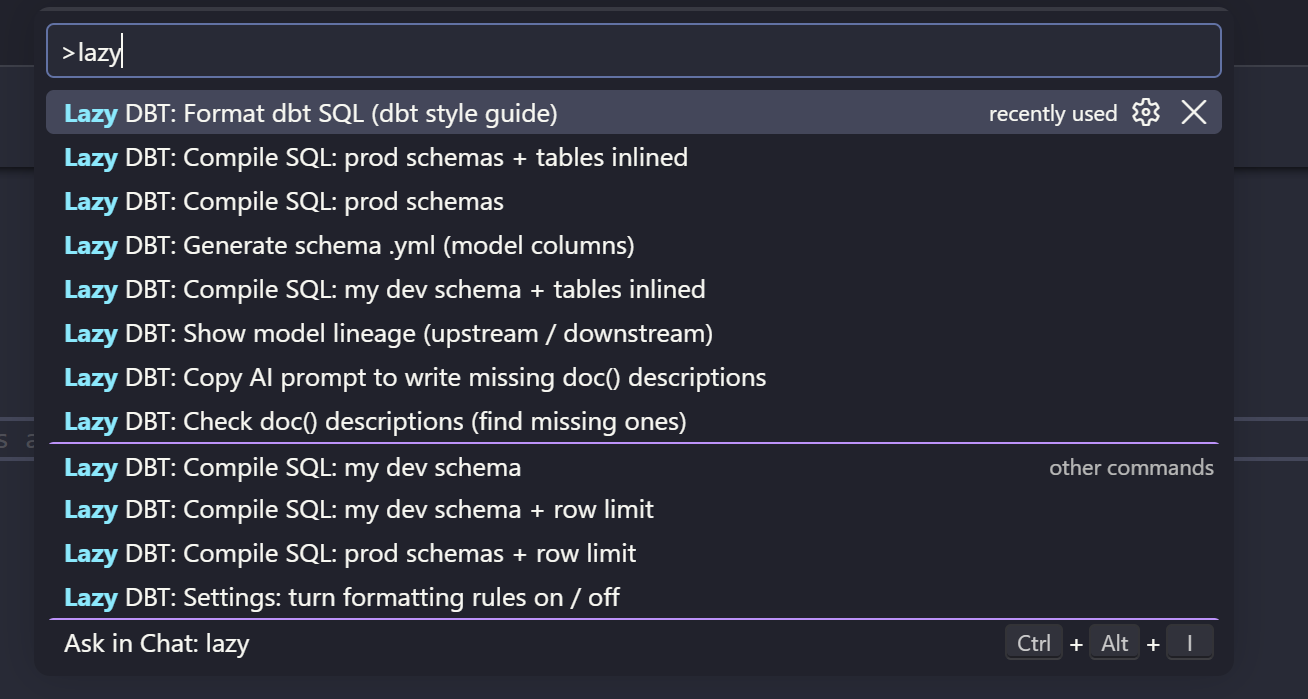
Everything is also in the Command Palette. Type lazy and you get the full list, including the Compile SQL variants.
- Format dbt SQL (dbt style guide): lowercase keywords, one column per line, trailing commas, CTEs separated by blank lines,
onon its own line,case ... endover several lines.alias = exprbecomesexpr as alias, and a barejoinbecomesinner join. It also works with the native Format Document (Shift+Alt+F) and format on save. - Generate schema .yml (model columns): writes
my_model.ymlnext tomy_model.sqlwith every output column, even behind a finalselect *. Existing descriptions are kept. - Check doc() descriptions (find missing ones): lists the
doc('...')references in your.ymlthat have no definition in your docs markdown, with empty{% docs %}blocks ready to paste. - Copy AI prompt to write missing doc() descriptions: copies the model SQL and the missing columns as a prompt you can paste into ChatGPT, Claude or Copilot.
- Show model lineage (upstream / downstream): which models this one is built from, in build order, and which models use it.
- Compile SQL: opens the model as plain SQL with
ref()andsource()replaced by the real tables. You pick prod or your dev schema, with or without a row limit. - Settings: turn formatting rules on / off: a checkbox per rule if you disagree with one of them.
Here is what the formatter does to a typical query.
Before:
SELECT o.id, c.name AS CustomerName, SUM(o.amount) total
FROM {{ ref('orders') }} o JOIN {{ ref('customers') }} c ON o.customer_id = c.id
WHERE o.status='paid' GROUP BY o.id, c.name
After:
select
    o.id,
    c.name as CustomerName,
    sum(o.amount) total

from {{ ref('orders') }} o

inner join {{ ref('customers') }} c
    on o.customer_id = c.id

where o.status='paid'

group by o.id, c.name
And here is what Show model lineage gives for a small fct_orders model. It opens as a markdown file, ready to copy into a ticket or a pull request.
# Lineage for fct_orders

Source: models\marts\fct_orders.sql

## Upstream  (dbt run -s +fct_orders)

```
fct_orders
├─ int_orders
│  ├─ stg_orders
│  └─ stg_order_items
├─ int_payments
│  ├─ stg_payments
│  └─ seed_payment_methods  (missing model)
└─ dim_customers
   └─ stg_customers
```

Build order (8 models):
1. stg_orders
2. stg_order_items
3. int_orders
4. stg_payments
5. int_payments
6. stg_customers
7. dim_customers
8. fct_orders  <- target

## Downstream  (dbt run -s fct_orders+)

```
fct_orders
├─ fct_orders_daily
│  └─ fct_orders_weekly
├─ fct_customer_revenue
└─ fct_refunds
```

Impacted models (4):
- fct_orders_daily
- fct_orders_weekly
- fct_customer_revenue
- fct_refunds

## Notes

- Referenced models not found in this project (package or typo): seed_payment_methods
It will not break your query
The formatter only touches whitespace and keyword casing. It never moves tokens around, except the alias = expr rewrite, which has its own check. After formatting, it compares the result with the original: comments, strings, Jinja, commas and every other token must be identical. If anything differs, the file is left as it was. Worst case, nothing happens.
Download and install
Version 0.11.0. Needs VS Code 1.85 or newer. Single .vsix file, no dependencies, nothing to configure.
- Download lazy-dbt-formatter-0.11.1.vsix.
- In VS Code, open the Extensions view, click the
...menu at the top right, choose Install from VSIX… and pick the file. Or from a terminal:code --install-extension lazy-dbt-formatter-0.11.0.vsix - Reload VS Code, right-click in a
.sqlmodel file and look for Lazy DBT.
That’s it. I hope it saves you a few minutes every day, as it does for me.